

We've all been there. A PC that's running like a vacuum cleaner, overheating for no apparent reason, and getting noisy even though it's not doing anything special. So we open the case… and then, the shock. Dust everywhere.
The question comes up often:Does physically cleaning your PC actually serve any purpose, or is it just "cosmetic" maintenance?
Spoiler alert: it's not useless at all. But it's not a magic FPS button either.
A computer, by definition, breathes.
Each fan draws in air to cool the components. And where there's air, there's dust. Lots of dust.
Over time, it accumulates in the most critical areas:
Fans, radiators, filters, sometimes even directly on the graphics card or CPU cooler. The closer the PC is to the ground, the faster the problem develops. Pet hair, smoke, and ambient humidity obviously don't help.
When a PC is dirty, the problem is thermal.
Dust acts as an insulator. It prevents air from circulating properly and prevents heat from escaping. As a result, temperatures rise.
And when temperatures rise, the equipment protects itself.
The processor and graphics card automatically reduce their frequency to prevent overheating. This is called thermal throttling.
In practical terms, your PC becomes less efficient. without you really realizing it.
No error message. No alert. Just a gradual drop in performance, fans spinning wildly, and sometimes micro-freezes or unexplained crashes.
Cleaning your PC does not increase performance.
On the other hand, it prevents them from deteriorating.
That's the key difference. After a cleanup, you won't magically gain 20 FPS. But you will get back to normal temperatures, a quieter, more stable PC, and consistent performance over time.
In reality, physical cleaning is a form of preventative maintenance. It doesn't make your PC more powerful, it prevents it from aging too quickly.
Not all components are affected in the same way.
The first to suffer are the fans.
Those of the case, the processor, and especially the graphics card. When their blades are clogged, they move less air and have to spin faster to compensate.
Radiators are also critical. Their role is to dissipate heat. If they are clogged with dust, they become almost useless.
Dust filters, often overlooked, also play a key role. If they become clogged, air no longer enters the case properly.
The food, too, accumulates dust.
It is never opened, but external cleaning with compressed air is still highly recommended.
Clean your PC properly
Cleaning a PC isn't complicated. But doing it wrong can be almost worse than doing nothing at all.
In most cases, compressed air is more than sufficient. Whether it's a standard can of compressed air or an electric blower... air duster, The principle remains the same: dislodge dust without ever forcing it. Electric blowers have the advantage of being more powerful, reusable, and often come with integrated nozzles or brushes. This is clearly more convenient if you regularly clean machines.
The golden rule remains the same: blow in short bursts, without holding the nozzle too close to the components, and above all, stop the fans to prevent them from spinning freely. A fan that speeds up due to the force of the airflow is never a good idea.
On very old machines, or on PCs that have never been cleaned, you sometimes encounter much more stubborn dust. Greasy, compacted dust that doesn't come off in the air. In these cases, a brush becomes essential. A soft brush, preferably antistatic, allows you to remove the residue without damaging the components.
There are also situations where air and a brush are no longer sufficient, particularly around connectors or exposed electrical components. This is where contact cleaner comes in. Specialized products, like those used in electronics, allow for cleaning without leaving residue and without risk to the components. Provided, of course, that it is used sparingly and on a PC that is completely powered off.
For disassembly, a simple screwdriver is usually sufficient, but it must be said that precision tool kits have become the norm. They offer various sizes and types of bits, suitable for PCs, phones, tablets, and consoles alike. It's the kind of tool you buy once and reuse for years.
Ultimately, cleaning your PC is a matter of method.
With the right tools and a minimum of precautions, it is a simple, safe, and extremely beneficial operation in the long term.
The ideal frequency depends a lot on the environment.
In typical use, cleaning every six months is more than enough.
If your PC is on the floor, if you have pets, or if your home is dusty, a cleaning every three months is much more suitable.
It's a small ritual that takes 15 to 20 minutes and can extend the life of your equipment by several years.
And what about thermal paste?
The question of thermal paste comes up often. Should it be changed when cleaning your PC?
Not necessarily. If your PC is less than two years old and the temperatures are fine, it's not essential. However, on a machine that's three to five years old, replacing the thermal paste can provide a real improvement in thermal performance.
Again, this is not a performance boost, but an improvement in stability and ease of use.
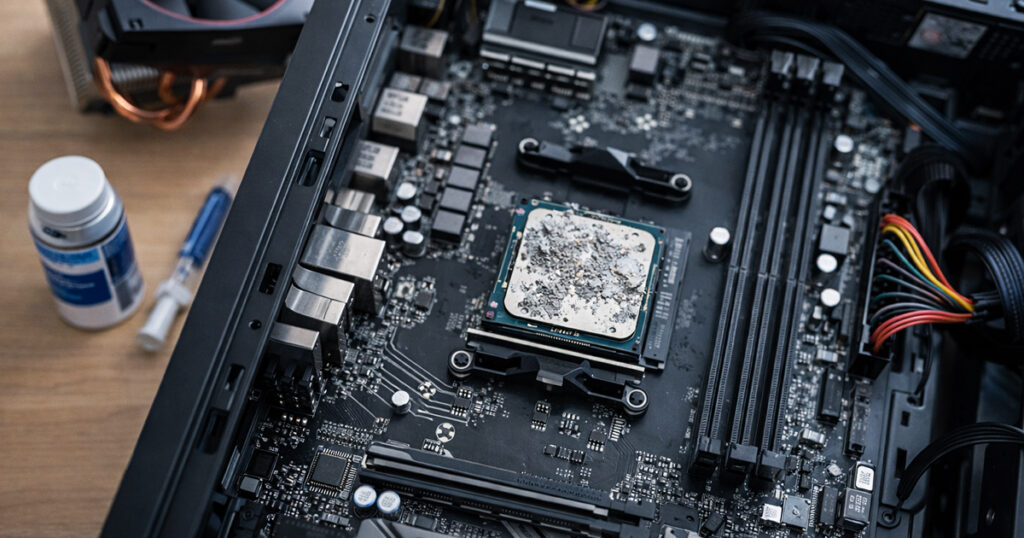
A clean PC is a PC that ages well.
In short, cleaning your PC is far from useless. It's not a miracle optimization, but it's essential maintenance.
A clean PC runs cooler, makes less noise, crashes less, and lasts longer.
Ultimately, that might be the real performance gain:
a computer that remains reliable over time.